Transfering files over the network with RFTPS
In this tutorial we will go over the process of transferring files over the network from one device to another. We will be using an application that I built in Rust that relies on the FTP protocol to send and receive files over the network, the sender/client can be any device (mobile phone,laptop,desktop) for the server we currently support Windows, Linux and MacOSX.
Here is some technical lingo you might not know and will come across in this tutorial:
- Rust – A programming language known for being fast, safe, and good for building secure applications.
- FTP (File Transfer Protocol) – A way to move files between computers over the internet, often used to upload websites.
- Sender/Client - The device sending the data
- Server - The device receiving the data
- Directory – Another word for a folder on your computer where you store files.
- Path – A way to tell the computer where a file or folder is located.
- Absolute path – The full location of a folder/file E.g,
C:\Users\YourUsername\Desktop\NewFolderC:\Users\YourUsername\Desktop\NewFile.txt
- Relative path – A location based on where you currently are.
- Absolute path – The full location of a folder/file E.g,
- IP Address
- Local - An address that exists only inside your home network and is between specific ranges, each machine has it’s unique address inside one of these ranges
- Public - The address that your devices use to connect to the internet, normally you have only 1 public ip address for all your devices, your router is in charge of internally resolving the requests to each machine’s private address
The application(RFTPS) is open source, feel free to look trough it’s code, submit any requests, or create/report a new issue
- Head over to https://github.com/hallowslab/rftps/releases
- At the top of the page you should have the latest version of
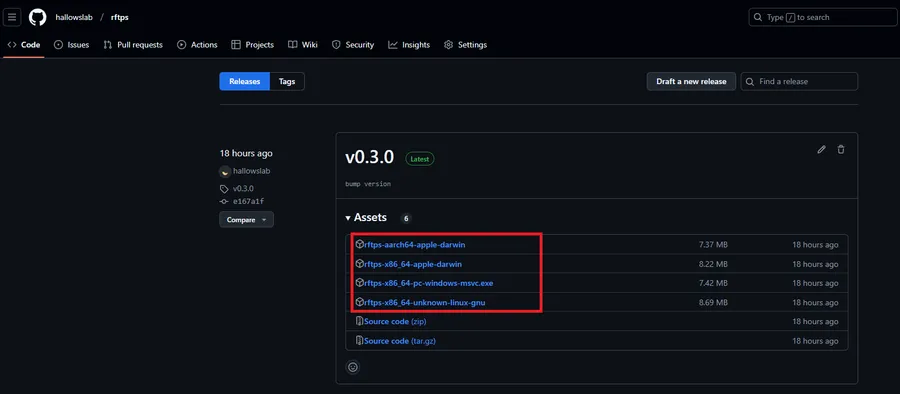
RFTPS - At the bottom of the release itself where it says “Assets” you will have multiple options to download, you will want the one that matches your system EX:
- Windows - rftps-x86_64-pc-windows-msvc.zip
- Linux - rftps-x86_64-unknown-linux-gnu.tar.gz
- Mac(Older Models) - rftps-x86_64-apple-darwin.tar.gz (untested, report any issues above)
- Mac (Newer models, M1&2 chips) - rftps-aarch64-apple-darwin.tar.gz (untested, report any issues above)
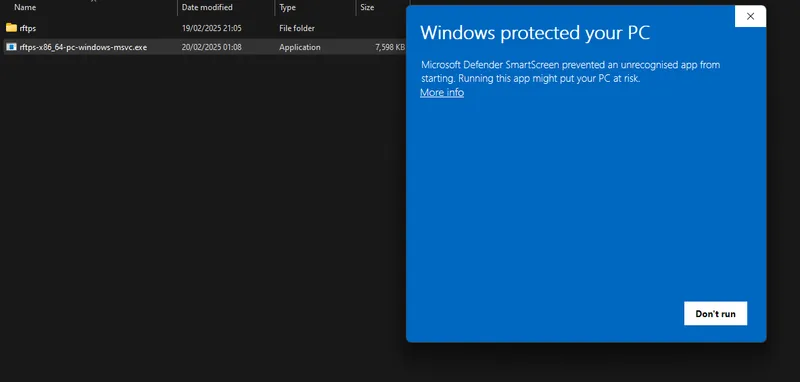
You might get a warning about an unrecognized app, since Windows does not know this app, and code signing licenses are expensive 🙃 It will dissapear with time if many users download the app
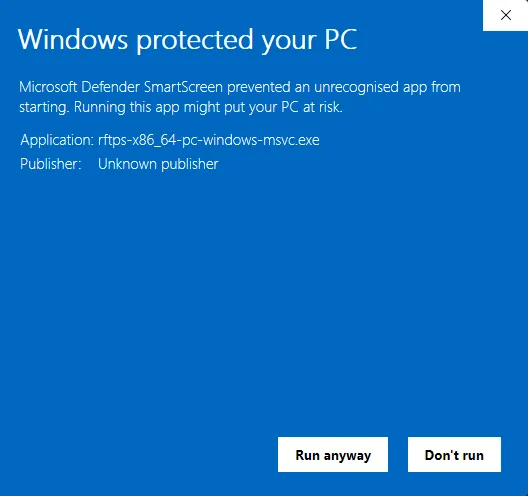
To get trough the warning click on “More info”
And then “Run anyway”
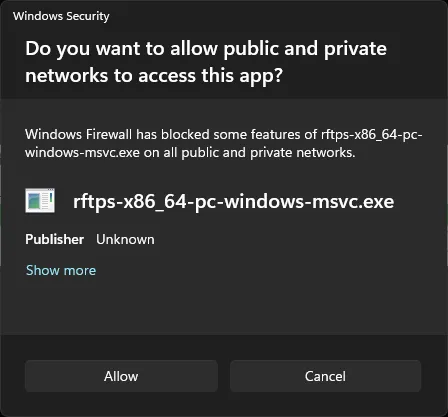
You will also need to allow the app network access, this is because we are transferring files over the network.
Auto configuration
- Extract the files from the zip archive, you will have an executable “rftps-x86_64-pc-windows-msvc.exe” and 2 certificate files cert.pem and key.pem (these are used to encrypt the data between client and server), the executable must always remain in the same place as the certificate files, if you move the executable move these 2 files also
- Move/Copy the executable “rftps-x86_64-pc-windows-msvc.exe” and the certificate files “cert.pem” and “key.pem” to a regular location like your desktop or an external drive (It can remain in the Downloads folder, however if you just execute the app as is, it will create a folder called rftps in your Downloads and that’s where the files you send will be received)
- If you don’t want to configure a username, password and location for the files just double-click
rftps-x86_64-pc-windows-msvc.exeand it will assume it’s defaults which are:- Username:
rftps - Password: It’s randomly generated everytime you execute
RFTPS - Directory:
./ftps - If you do want to configure these options continue following the steps
- Username:
You will need to keep the terminal window that appears open until you are finished transferring the files (that window is the RFTPS server). When you are finished you can just close the window and the program will stop executing, to run it again you can double-click it again
Manual configuration
- The
RFTPSexecutable allows for the user to configure the username and password for authentication along with some other parameters(more to come!):-a, --address: Address for the FTP server to receive communicattions, default is “rftps”-p, --port: Port that the FTP server listens on-d, --directory: This is the place the files will be sent to, the default isRFTPScreates a folder called “rftps” in the same directory as the executable-u, --username: Username for FTP authentication between client and server-P, --password: Password for the FTP user-f, --enable-ftps: Enables/disables FTPS (encryption between client and server), values can be true or false--cert-pem: The certificate file “cert.pem”--key-pem: The key for the certificate file “key.pem”
- Manually executing
RFTPSto specify parameters:- On Windows 10 and above hold shift and right-click on the directory that the executable is, for example if it’s in Desktop hold shift and right-click your Desktop background and in the windows context menu you should see either “Open terminal here” or “Open Powershell Window here”, click on either one of those.
- The same applies to any folder, just navigate to it in Windows explorer and shift+right-click
- You should now have a new “Terminal/Command/Powershell” window open
- Start the
RFTPSexecutable specifying parameters:RFTPScan be called by it’s name and you can pass the parameter--helpto show it’s usage instructions:.\rftps-x86_64-pc-windows-msvc.exe --help(The .\ on Windows means that there is an executable in this path)- Here we are specifying some parameters manually:
.\rftps-x86_64-pc-windows-msvc.exe --port 2123 -d "E:\NewFolder" -u hallowslab --password "9x3_?oJ+U/f-H#
- Verify how to connect with your device
Connecting client to server
In order to connect to the FTP server you will need to install an FTP client on the device that will be sending the files, some examples below.
-
Android:
- File Manager + - Click Here for the tutorial
- CX File Explorer
- AndFTP
-
IOS:
- FTPManager - Click Here for the tutorial
-
Windows:
- Microsoft FTP utility
- Filezilla - Click Here for the tutorial
- Should support most linux clients trough WSL
-
Linux:
-
MacOS
- Filezilla - Click Here for the tutorial
- Commander One
- Cyberduck
If you have any issues with RFTPS itself feel free to submit them on github and if you experience any issues you can reach out to me trough my socials